Posts

Speed up Data Pump Import by suppressing redo generation

Customer Request : Import 20GB  Dump file without downtime(Without changing into noarchivelog mode). Problem: Database running in Archive log mode  and my archive destination size is very limited. Solution: Using  transform=disable_archive_logging:Y we can avoid redo generation and it will speedup import. Test:  Without Feature:  ============  Before Import:  SQL> select * from v$recovery_area_usage where FILE_TYPE='ARCHIVED LOG'; FILE_TYPE               PERCENT_SPACE_USED PERCENT_SPACE_RECLAIMABLE NUMBER_OF_FILES     CON_ID ----------------------- ------------------ ------------------------- --------------- ---------- ARCHIVED LOG                          1.74                         0               7       ...
IMPDP is Taking Long Time at defining state

IMPDP is Taking Long Time at defining state with SYS User. Defining State itself taking more than 3 hours and actual data import finishing in 1 hour. We tried setting all performance parameters but no luck. Note: We are doing import using sys user in 12c Database (Exported from 11g Database). After struggling one week still no luck :( Solution :  we tried import with  system user by mistake and defining state completed in 2 Minutes :) use SYSTEM, not SYS on datapump. SYS is only for the legacy exp/imp.  From 12c Use SYSTEM user  to avoid Import performance issues. impdp system/manager dumpfile=test:filename.dmp logfile=test:filename.log

Oracle Database 12.2 books

All Database 12.2 Books link: http://docs.oracle.com/database/122/nav/portal_booklist.htm

Oracle Database 12.2.0.1 New Init Parameters

Oracle Database 12.2.0.1 is available now in the Oracle Cloud. And this is the list of 46 new init.ora/spfile parameters compared to Oracle Database 12.1.0.2 - including the links (where possible) to the Oracle Database 12.2 Reference documentation. Parameter Description allow_global_dblinks LDAP lookup for DBLINKS allow_group_access_to_sga Allow read access for SGA to users of Oracle owner group approx_for_aggregation Replace exact aggregation with approximate aggregation approx_for_count_distinct Replace count distinct with approx_count_distinct approx_for_percentile Replace percentile_* with approx_percentile asm_io_processes number of I/O processes per domain in the ASM IOSERVER instance autotask_max_active_pdbs Setting for Autotask Maximum Maintenance PDBs awr_pdb_autoflush_enabled Enable/Disable AWR automatic PDB flushing cdb_cluster [undocumented if TRUE startup in CDB Cluster mode cdb_cluster_name [undocumente...

How to Recover Agent Home on OMS got deleted accidentally

How to Recover Agent Home on OMS got deleted accidentally Ensure that no agent java process is alive from the agent home 1. Rename agent_inst directory under agent base: /usr/oraoms/product/Agent12c/* --> You donot have agent_inst dir 2. Run the following command to reconfigure agent: NOTE: Replace all the required fields in the below command as per your environment $ cd /usr/oraoms/product/Agent12c/core/12.1.0.5.0/sysman/install $ agentDeploy.bat AGENT_BASE_DIR=/usr/oraoms/product/Agent12c AGENT_INSTANCE_HOME=/usr/oraoms/product/Agent12c/agent_inst AGENT_PORT=<Agent-Port> -configOnly OMS_HOST=<OMS HOSTNAME WITH DOMAIN> EM_UPLOAD_PORT=<OMS HTTPS UPLOAD PORT> AGENT_REGISTRATION_PASSWORD=<PROVIDE AGENT REGISTRATION PASSWORD> 3. If the above command completes successfully then follow the below steps: <AGENT_HOME>/BIN> ./emctl stop agent <AGENT_HOME>/BIN> ./emctl secure agent <AGENT_HOME>/BIN> ./emctl start agent ...

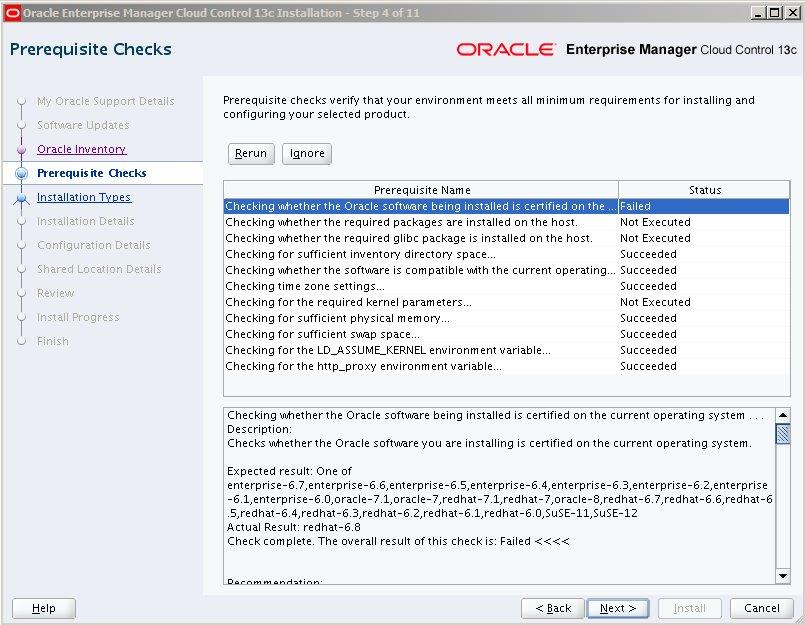
OEM 13C Installation fails pre-requisites are getting failed in REDHAT 6.8

Image
We are installing OEM13C in REDHAT 6.8 and pre-requisites are getting failed due to the non-certified version. The certification information on My Oracle Support lists Red Hat Enterprise Linux 6 as a certified platform for "Enterprise Manager Base Platform - OMS 13.1.0.0.0". The certification information does not list any specific version of Red Hat Enterprise Linux 6, such as 6.1, 6,2, 6,3, 6,4, 6.5, 6.6, 6.7, etc., it only says "Red Hat Enterprise Linux 6". However the EM 13.1 installation process doesn't recognize 6.8 as a certified version of RHEL 6. The error from the installer is shown below. The installer will not allow this to be skipped so the install can continue.   13.1 EM install does not support on RHEL6.8. This is taken care in next release of 13c OEM. For 13.1 EM the following documentation bug is logged to get the OTN document updated with this information: Bug 23328216 - 13c EM install on RHEL6.8 Fails Workaround: Once t...

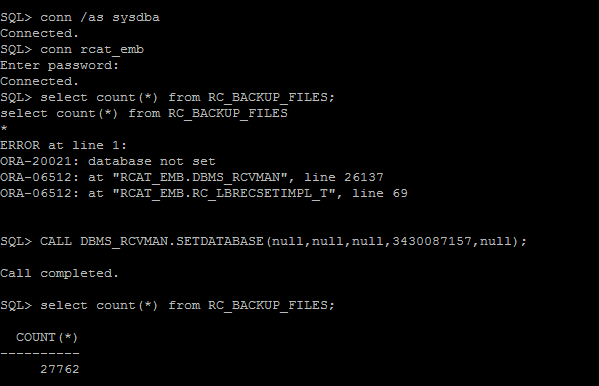
RMAN Catalog RC_BACKUP_FILES View access Issue

Image
When I am trying to access RC_BACKUP_FILES view from our RMAN Catalog database,  getting following error .. SQL> select count(*) from RC_BACKUP_FILES; select count(*) from RC_BACKUP_FILES * ERROR at line 1: ORA-20021: database not set ORA-06512: at "RCAT_EMB.DBMS_RCVMAN", line 26137 ORA-06512: at "RCAT_EMB.RC_LBRECSETIMPL_T", line 69 Workaround: It is usually more convenient to access this information using the LIST BACKUP and LIST COPY  commands from within RMAN. We must use DBMS_RCVMAN.SetDatabase to select a database from the recovery catalog schema before you can use this view. SQL> SELECT NAME,DBID FROM V$DATABASE; NAME            DBID --------- ---------- XXXXXX 3430087157                                ...