
Patching Prereq Failing


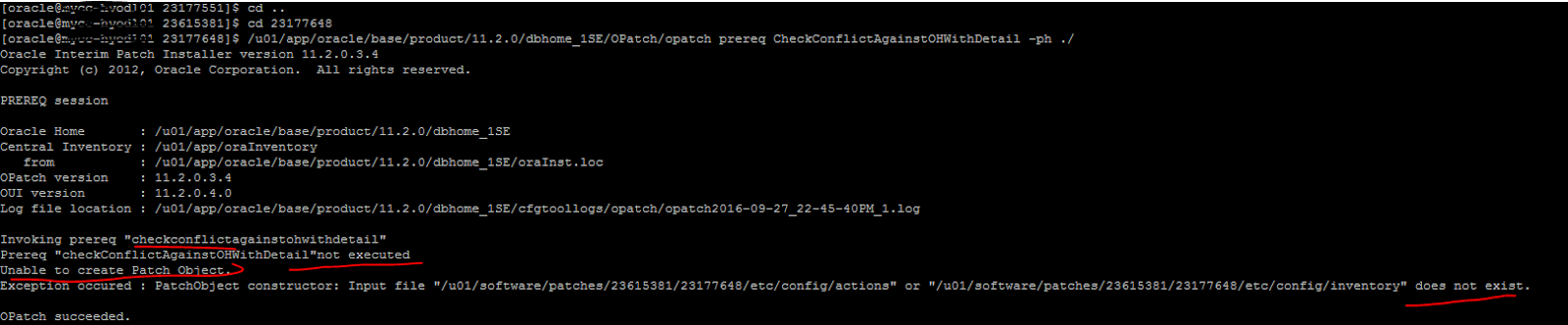
opatch prereq CheckConflict fails with Exception occured : PatchObject constructor:Input file does not exist


Patch Prereq step is failing with following error..


The OPatch option of -phBaseDir option is used to specify the path to base dir where all the patches to be applied are kept. 
The command enterred was
$ opatch prereq CheckConflictAgainstOHWithDetail -ph ./
 OPatch will look in $ORACLE_HOME/patches for the following directory structure:
$ORACLE_HOME/patches/23615381/etc/config
Since unzipping the patch creates multiple directories, that directory structure does not exist and -phBaseDir must be the directory that is created when the patch is unzipped. 
-phBaseDir $/u01/software/patches/23615381/23177648


Comments

  1. Patching Prereq Failing >>>>> Download Now

    >>>>> Download Full

    Patching Prereq Failing >>>>> Download LINK

    >>>>> Download Now

    Patching Prereq Failing >>>>> Download Full

    >>>>> Download LINK m4

    ReplyDelete

Post a Comment

Popular posts from this blog

ORA-65139: Mismatch between XML metadata file and data file

Error: CDB$ROOT@EBTUPRDC> CREATE PLUGGABLE DATABASE EBTUSPRDPDB1 using '/home/oracle/EBTUSPRDC.xml' nocopy tempfile reuse; CREATE PLUGGABLE DATABASE EBTUSPRDPDB1 using '/home/oracle/EBTUSPRDC.xml' nocopy tempfile reuse * ERROR at line 1: ORA-65139: Mismatch between XML metadata file and data file /u05/odb/ORADATA_1/EBTUSPRDC/datafile/system.1531.807800993 for value of fcpsb (2230502002 in the plug XML file, 2230505492 in the data file) Fix: Don't open Non-CDB database until we complete pdb creation other wise we will get above error. Shutdown immediate; startup mount; alter database open read only; create xml file. shutdown immediate; Connect to CDB and Create Pluggable database .

Useful OEM Queries to get Target details from OEM Repository

List Targets with TNS Listener ports configured : SELECT mgmt$target.host_name , mgmt$target.target_name , mgmt$target.target_type , mgmt$target_properties.property_name , mgmt$target_properties.property_value FROM mgmt$target , mgmt$target_properties WHERE ( mgmt$target.target_name = mgmt$target_properties.target_name ) AND ( mgmt$target.target_type = mgmt$target_properties.target_type ) and ( mgmt$target.target_type = 'oracle_listener' ) and ( mgmt$target_properties.property_name = 'Port' ); Devora02       LISTENER_ora02                       oracle_listener Port 1529 Devora01       LISTENER_ora01                       oracle_listener Port 1529 Devora04       LISTENE...

TFA-00002 : Oracle Trace File Analyzer (TFA) is not running

TFA Failed to start listening for commands on one of the Rac Node : As a root user /etc/init.d/init.tfa  start Starting TFA.. start: Job is already running: oracle-tfa Waiting up to 100 seconds for TFA to be started.. . . . . . . . . . . . . . . . . . . . . . . . . . . . . . . . . . . . Successfully started TFA Process.. . . . . . TFA-00002 : Oracle Trace File Analyzer (TFA) is not running TFA Failed to start listening for commands Solution : run synctfanodes.sh  if you have root password . if no root password copy below files to TFA Failed node and try to restart TFA .. Please check whether these 4 files exist on all nodes are similar. TFA_HOME/server.jks TFA_HOME/client.jks TFA_HOME/internal/ssl.properties   TFA_HOME/internal/ portmapping.txt If not similar just copy these files to TFA Failing node and try TFA Restart ..It Worked for me .   [root@host01]# ./tfactl  -v "debug" start Starting TFA...