
/U01 Space Consumption By CVUCHECKREPORT.XML In Cluster

/U01 Space Consumption By CVUCHECKREPORT.XML In Cluster


We are observing /u01 is full in RAC Environments due to CVUCHECKREPORT.XML Getting created and not purged in  /u01/app/oracle/crsdata/@global/cvu/baseline/cvures/
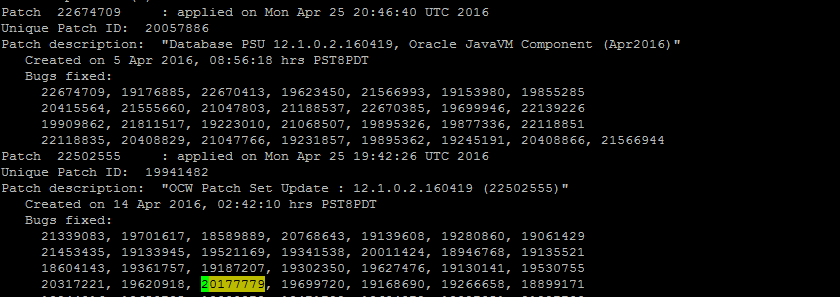
 Oracle Provided a Patch to fix  this Bug 20177779 in April PSU . We have already applied April PSU but issue was not fixed.


CVU HEALTH CHECK REPORTS NOT PURGED EVEN AFTER APPLYING PATCH FOR 20177779 (Patch).


Bug 20177779 has been replaced by new bug 22594310.

So Now we need to Apply 22594310 to fix this bug in all Cluster environments.

Workaround: Purge CVUCHECKREPORT.XML files Manually till we apply this Patch.

-anil12cdba

Comments

Post a Comment

Popular posts from this blog

ORA-65139: Mismatch between XML metadata file and data file

Error: CDB$ROOT@EBTUPRDC> CREATE PLUGGABLE DATABASE EBTUSPRDPDB1 using '/home/oracle/EBTUSPRDC.xml' nocopy tempfile reuse; CREATE PLUGGABLE DATABASE EBTUSPRDPDB1 using '/home/oracle/EBTUSPRDC.xml' nocopy tempfile reuse * ERROR at line 1: ORA-65139: Mismatch between XML metadata file and data file /u05/odb/ORADATA_1/EBTUSPRDC/datafile/system.1531.807800993 for value of fcpsb (2230502002 in the plug XML file, 2230505492 in the data file) Fix: Don't open Non-CDB database until we complete pdb creation other wise we will get above error. Shutdown immediate; startup mount; alter database open read only; create xml file. shutdown immediate; Connect to CDB and Create Pluggable database .

Useful OEM Queries to get Target details from OEM Repository

List Targets with TNS Listener ports configured : SELECT mgmt$target.host_name , mgmt$target.target_name , mgmt$target.target_type , mgmt$target_properties.property_name , mgmt$target_properties.property_value FROM mgmt$target , mgmt$target_properties WHERE ( mgmt$target.target_name = mgmt$target_properties.target_name ) AND ( mgmt$target.target_type = mgmt$target_properties.target_type ) and ( mgmt$target.target_type = 'oracle_listener' ) and ( mgmt$target_properties.property_name = 'Port' ); Devora02       LISTENER_ora02                       oracle_listener Port 1529 Devora01       LISTENER_ora01                       oracle_listener Port 1529 Devora04       LISTENE...

TFA-00002 : Oracle Trace File Analyzer (TFA) is not running

TFA Failed to start listening for commands on one of the Rac Node : As a root user /etc/init.d/init.tfa  start Starting TFA.. start: Job is already running: oracle-tfa Waiting up to 100 seconds for TFA to be started.. . . . . . . . . . . . . . . . . . . . . . . . . . . . . . . . . . . . Successfully started TFA Process.. . . . . . TFA-00002 : Oracle Trace File Analyzer (TFA) is not running TFA Failed to start listening for commands Solution : run synctfanodes.sh  if you have root password . if no root password copy below files to TFA Failed node and try to restart TFA .. Please check whether these 4 files exist on all nodes are similar. TFA_HOME/server.jks TFA_HOME/client.jks TFA_HOME/internal/ssl.properties   TFA_HOME/internal/ portmapping.txt If not similar just copy these files to TFA Failing node and try TFA Restart ..It Worked for me .   [root@host01]# ./tfactl  -v "debug" start Starting TFA...