Posts

How to Recover Agent Home on OMS got deleted accidentally

How to Recover Agent Home on OMS got deleted accidentally Ensure that no agent java process is alive from the agent home 1. Rename agent_inst directory under agent base: /usr/oraoms/product/Agent12c/* --> You donot have agent_inst dir 2. Run the following command to reconfigure agent: NOTE: Replace all the required fields in the below command as per your environment $ cd /usr/oraoms/product/Agent12c/core/12.1.0.5.0/sysman/install $ agentDeploy.bat AGENT_BASE_DIR=/usr/oraoms/product/Agent12c AGENT_INSTANCE_HOME=/usr/oraoms/product/Agent12c/agent_inst AGENT_PORT=<Agent-Port> -configOnly OMS_HOST=<OMS HOSTNAME WITH DOMAIN> EM_UPLOAD_PORT=<OMS HTTPS UPLOAD PORT> AGENT_REGISTRATION_PASSWORD=<PROVIDE AGENT REGISTRATION PASSWORD> 3. If the above command completes successfully then follow the below steps: <AGENT_HOME>/BIN> ./emctl stop agent <AGENT_HOME>/BIN> ./emctl secure agent <AGENT_HOME>/BIN> ./emctl start agent ...
OEM 13C Installation fails pre-requisites are getting failed in REDHAT 6.8

Image
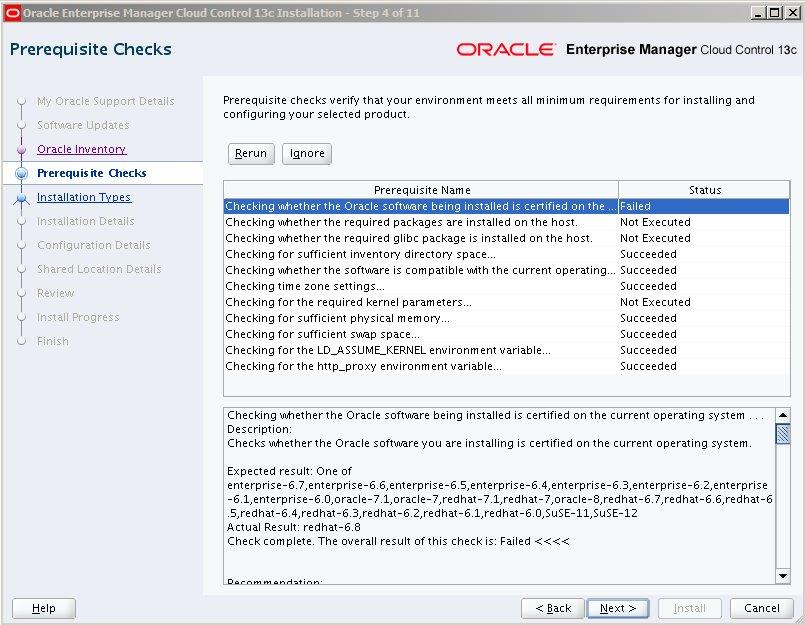
We are installing OEM13C in REDHAT 6.8 and pre-requisites are getting failed due to the non-certified version. The certification information on My Oracle Support lists Red Hat Enterprise Linux 6 as a certified platform for "Enterprise Manager Base Platform - OMS 13.1.0.0.0". The certification information does not list any specific version of Red Hat Enterprise Linux 6, such as 6.1, 6,2, 6,3, 6,4, 6.5, 6.6, 6.7, etc., it only says "Red Hat Enterprise Linux 6". However the EM 13.1 installation process doesn't recognize 6.8 as a certified version of RHEL 6. The error from the installer is shown below. The installer will not allow this to be skipped so the install can continue.   13.1 EM install does not support on RHEL6.8. This is taken care in next release of 13c OEM. For 13.1 EM the following documentation bug is logged to get the OTN document updated with this information: Bug 23328216 - 13c EM install on RHEL6.8 Fails Workaround: Once t...

RMAN Catalog RC_BACKUP_FILES View access Issue

Image
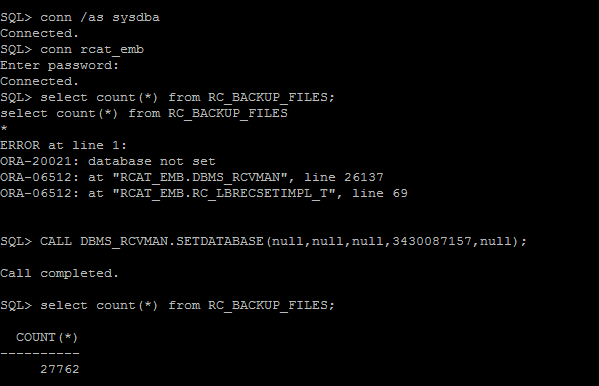
When I am trying to access RC_BACKUP_FILES view from our RMAN Catalog database,  getting following error .. SQL> select count(*) from RC_BACKUP_FILES; select count(*) from RC_BACKUP_FILES * ERROR at line 1: ORA-20021: database not set ORA-06512: at "RCAT_EMB.DBMS_RCVMAN", line 26137 ORA-06512: at "RCAT_EMB.RC_LBRECSETIMPL_T", line 69 Workaround: It is usually more convenient to access this information using the LIST BACKUP and LIST COPY  commands from within RMAN. We must use DBMS_RCVMAN.SetDatabase to select a database from the recovery catalog schema before you can use this view. SQL> SELECT NAME,DBID FROM V$DATABASE; NAME            DBID --------- ---------- XXXXXX 3430087157                                ...

/U01 Space Consumption By CVUCHECKREPORT.XML In Cluster

Image
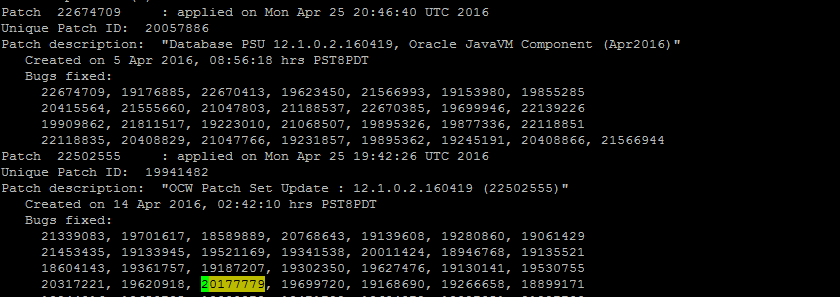
/U01 Space Consumption By CVUCHECKREPORT.XML In Cluster We are observing /u01 is full in RAC Environments due to CVUCHECKREPORT.XML Getting created and not purged in  /u01/app/oracle/crsdata/@global/cvu/baseline/cvures/   Oracle Provided a Patch to fix  this Bug 20177779 in April PSU . We have already applied April PSU but issue was not fixed. CVU HEALTH CHECK REPORTS NOT PURGED EVEN AFTER APPLYING PATCH FOR 20177779 (Patch). Bug 20177779 has been replaced by new bug 22594310. So Now we need to Apply 22594310 to fix this bug in all Cluster environments. Workaround: Purge CVUCHECKREPORT.XML files Manually till we apply this Patch. -anil12cdba

Useful OEM Queries to get Target details from OEM Repository

List Targets with TNS Listener ports configured : SELECT mgmt$target.host_name , mgmt$target.target_name , mgmt$target.target_type , mgmt$target_properties.property_name , mgmt$target_properties.property_value FROM mgmt$target , mgmt$target_properties WHERE ( mgmt$target.target_name = mgmt$target_properties.target_name ) AND ( mgmt$target.target_type = mgmt$target_properties.target_type ) and ( mgmt$target.target_type = 'oracle_listener' ) and ( mgmt$target_properties.property_name = 'Port' ); Devora02       LISTENER_ora02                       oracle_listener Port 1529 Devora01       LISTENER_ora01                       oracle_listener Port 1529 Devora04       LISTENE...

Patching Prereq Failing

Image
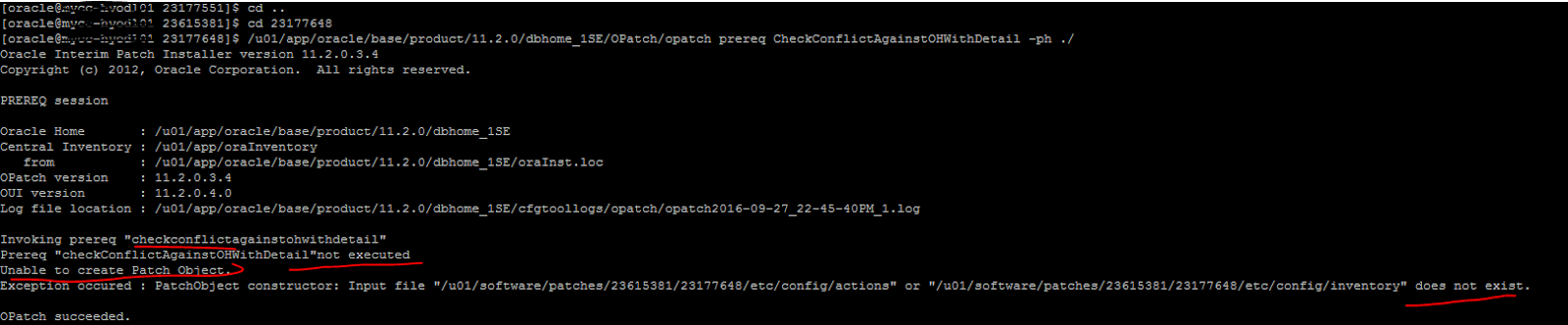
opatch prereq CheckConflict fails with Exception occured : PatchObject constructor:Input file does not exist Patch Prereq step is failing with following error.. The OPatch option of  -phBaseDir  option is used to specify the path to base dir where all the patches to be applied are kept.  The command enterred was $ opatch prereq CheckConflictAgainstOHWithDetail -ph ./  OPatch will look in $ORACLE_HOME/patches for the following directory structure: $ORACLE_HOME/patches/ 23615381 /etc/config Since unzipping the patch creates multiple directories, that directory structure does not exist and  -phBaseDir  must be the directory that is created when the patch is unzipped.  -phBaseDir $/u01/software/patches/23615381/23177648

Oracle Database 12.2 New Features

********************************************** 12.2 New  Features from one of the presentation. ********************************************** AWR now available on PDB level Memory management on PDB level PDB cloning is now possible also online Flashback now possible on PDB level Backup / Restore on PDB level with RMAN